

For many businesses and creators, Instagram Stories are where the real selling happens. Feed posts build awareness and Reels reach new people, but Stories speak directly to an engaged audience, and the link sticker turns that attention into visits to a shop, a booking page, a newsletter or a new blog post. When it works, a single Story can drive more traffic than a week of feed posts.
When it doesn’t, the link sticker sits on the screen and hardly anyone taps it. The difference usually comes down to how the Story is built and whether the account is tracking the right numbers. This guide explains how to measure Story link performance, why tap rates vary so much and the practical changes that turn viewers into visitors.
A Quick Refresher on the Link Sticker
For years, links in Stories were reserved for accounts with large followings or verified badges. That changed in October 2021, when Instagram expanded the link sticker to everyone, with exceptions for new accounts and those that repeatedly break its rules (About Instagram). Today any eligible account can add a link sticker to a Story, customise the text on it and place it anywhere on the frame.
How to Measure Link Clicks and Tap Rate
Professional accounts can see link clicks in the insights for each Story, alongside views, replies and navigation data such as forward taps and exits (Instagram Help Center). The raw number of clicks is useful, but it doesn’t say much on its own. A Story seen by 10,000 people that earns 100 clicks is performing very differently from one seen by 500 people that earns the same 100.
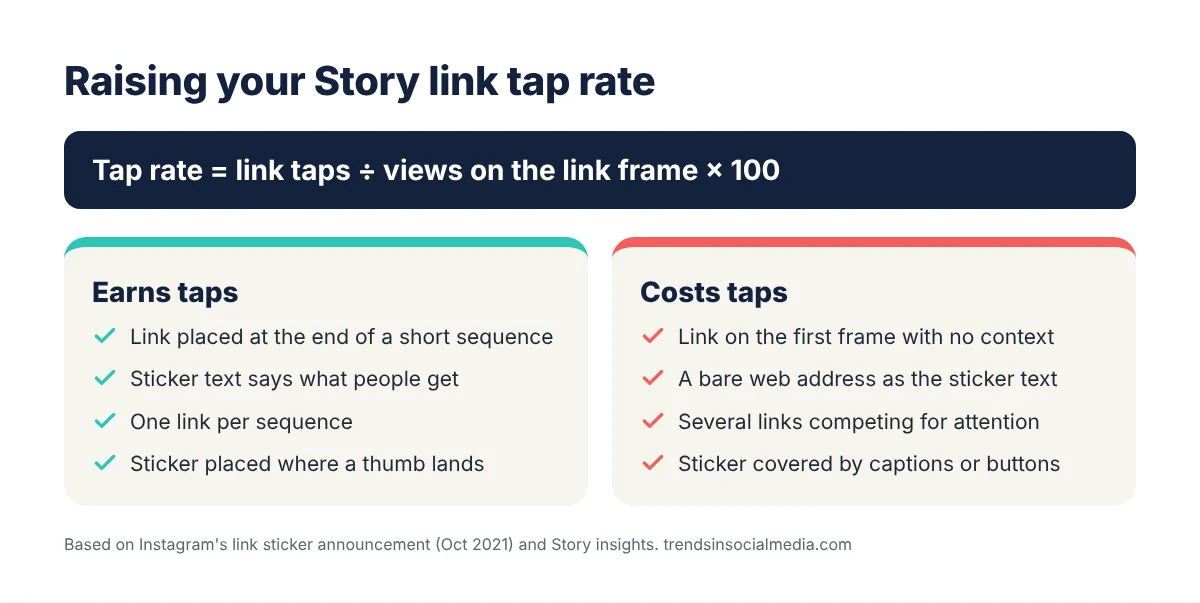
That is why tap rate is the better measure. It is calculated by dividing the number of link clicks by the number of views on the frame with the sticker, then multiplying by 100. A frame with 2,000 views and 60 link clicks has a tap rate of 3%. Tracking that figure across Stories makes it possible to compare frames fairly, spot what works and see whether changes are actually improving performance.
Why Some Stories Get Taps and Others Don’t
The biggest factor is the reason to tap. A link sticker on its own, dropped on a frame with no context, asks viewers to do something without telling them why. Stories that get clicked tend to build up to the link: a frame showing a problem, a frame teasing the solution and then the link, with a clear sense of what the viewer will get on the other side. The sticker text matters too. Customising it to say something specific, such as “Get the free checklist” or “See the full menu”, consistently outperforms a generic web address.
Position and timing play a role as well. Viewers tap through Stories quickly, and audiences tend to thin out with each frame, so a link on the tenth frame of a long sequence will be seen by far fewer people than one at the end of a short, three- or four-frame build-up. A link dropped on the very first frame, with no context, tends to struggle for the opposite reason. Placing the sticker where a thumb naturally lands, away from the edges and clear of captions and the reply bar, also helps. And trust matters most of all: people click links from accounts they believe will send them somewhere worthwhile, a theme explored in how social media credibility shapes online buying decisions.
Practical Ways to Raise Your Tap Rate
Start by making the destination feel worth it. Showing a preview of what is behind the link, such as a screenshot of the product page, a snippet of the article or a short clip of the offer, removes uncertainty and gives people a reason to tap. Adding urgency where it is genuine, such as a countdown sticker for a limited-time sale, can push hesitant viewers to act.
It also pays to keep to one destination per sequence. Several links competing for attention split viewers’ taps and make it harder to tell which offer actually worked. Saving link Stories to Highlights extends their life beyond 24 hours, and a well-organised profile helps turn those Highlights into an ongoing source of clicks, as covered in our guide to optimising an Instagram profile. For a more detailed walkthrough, there is a step-by-step guide to boosting Story link clicks that covers sequencing and sticker design.
Track What Happens After the Click
Instagram can tell an account how many people tapped a link, but not what they did next. Adding UTM parameters to Story links closes that gap. Google explains how to build these campaign URLs in its Analytics documentation; tagging each link with a source, medium and campaign name means visits from Instagram Stories show up clearly in analytics, along with sign-ups and purchases. Over time, that data reveals which kinds of Stories drive not just clicks but results.
Some businesses also support their Stories with outside help, working with a social media growth company or buying Story link click packages to test a new landing page. The caveat is that clicks only matter if they come from people who are genuinely interested; clicks that don’t lead to real visits can skew analytics and won’t turn into sales. UTM tracking makes it easy to see the difference.
The Takeaway
Instagram Story link clicks are one of the most direct ways to turn attention into action, but raw click counts don’t tell the whole story. Measure tap rate by dividing link clicks by views on the sticker frame, then improve it by giving viewers a clear reason to tap, customising the sticker text, placing the link at the end of a short build-up and sticking to one destination per sequence. Add UTM parameters so every click can be followed through to a result, and keep refining the Stories that bring in visitors who stay.
