
 By Paul Walker
If you want to buy deals, sell items fast, or build a legitimate side hustle on social media, this Facebook Marketplace guide is your starting point. Facebook Marketplace has grown from a simple local classifieds tool into one of the world’s most active peer-to-peer commerce platforms, with over one billion people using it every month. Whether you’re clearing out a spare room or sourcing inventory to flip for profit, this complete guide walks you through everything: how to access Marketplace, how the algorithm works, current fees, safety tips, and the 2026 policy updates you need to know.
What Is Facebook Marketplace? (And Why It Matters in 2026)
Facebook Marketplace is Meta’s built-in buy-and-sell platform, integrated directly into the Facebook app and website. Launched in 2016, it was originally a local peer-to-peer classifieds tool, think of it as a safer, social-profile-backed version of Craigslist. Since then, it has expanded to support nationwide shipping in certain categories, business listings, and even eBay product integrations in select markets.
In 2026, Marketplace matters more than ever. The global resale market is projected to reach $350 billion by 2027 (RetailDive), and Facebook Marketplace sits at the centre of that growth. With no listing fees for local sales, a massive built-in audience, and direct Messenger integration, it is one of the lowest-cost ways to start selling online today.
How to Access Facebook Marketplace
Getting started takes less than 60 seconds:
- On mobile: Open the Facebook app and tap the Marketplace icon (the storefront symbol) in the bottom navigation bar.
- On desktop: Visit facebook.com and click the Marketplace icon in the left sidebar.
- You must be 18 or older with an active Facebook account. In some countries or new accounts, Marketplace activation may take up to 30 days of account activity.
If Marketplace does not appear, try updating your app, clearing your cache, or checking whether Marketplace has launched in your region at facebook.com/marketplace/expansion.
How to Buy on Facebook Marketplace: Find the Best Deals
Search for what you want using specific keywords, include brand, model, and condition (e.g., ‘Samsung Galaxy S24 used excellent’). Use the filters to narrow by price range, category, location radius, and item condition.
Step-by-step buying process:
- Check the seller’s profile: Look for complete name, profile photo, mutual friends, and positive reviews.
- Inspect all photos: Request additional images if needed. Ask about defects, dimensions, or functionality.
- Negotiate politely: Most sellers expect 5–15% negotiation. Start slightly below your target price.
- Pay securely: Use Facebook Pay for shipped items. For local pickups, use cash or verified payment apps. Never wire money or share bank details.
- Meet safely: Choose public locations, coffee shops, police station parking lots, or busy shopping centres are all good choices.
Pro tips: Filter for ‘Free’ items to find giveaways. Sort by ‘Newest’ to catch fresh listings before they sell. Save searches and enable notifications for high-demand keywords.
How to Sell on Facebook Marketplace: Turn Items into Cash
Tap ‘Sell’ (on mobile) or ‘Create New Listing’ (on desktop). Choose your listing type: Item for Sale, Vehicle, Property, or Job Opening. Then follow these steps:
Prep your item: Clean it, take well-list photos from multiple angles, buyers love details. If you are sharing your listings in Facebook Groups or boosting them as ads, pairing product shots with free lifestyle images for social media can make your posts significantly more eye-catching.
- Photos: Upload up to 10 images. Use natural daylight or a bright white background. Include multiple angles and close-ups of any flaws.
- Title: Be specific. Include brand, model, size, and condition. Example: ‘IKEA Kallax White Shelving Unit 4×4, Excellent Condition’
- Description: State what it is, condition, dimensions, reason for selling, and pickup/shipping options.
- Price: Research sold listings in your category. Facebook buyers expect to negotiate, so price 5–10% above your minimum acceptable amount.
- Category & Location: Always assign the correct category, miscategorised listings rank lower in search.
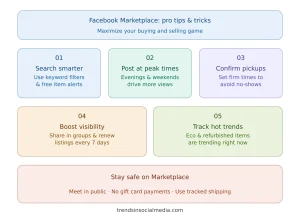
- Renew weekly: Re-listing every 7 days resets your position in search results.
To reach buyers outside your area, enable shipping in Commerce Manager (Settings → Commerce Manager → set up payout info). Note: As of February 24, 2025, new prepaid shipping labels are no longer available. You will need to arrange shipping independently.
If you are selling as a business, enable professional mode on your profile for better analytics. And if you are thinking about turning your social media skills into a full career, check out our guide to the most in-demand social media marketing jobs you can land in 2026.
Facebook Marketplace Fees Explained (2026 Update)
One of the most common questions about Marketplace is: does it cost money?
- Local sales (cash/in-person): Completely free, no listing fee, no commission.
- Shipped items via Facebook Checkout: 5% fee per transaction (minimum $0.40).
- Business listings via Ads Manager: Standard Meta ad spend, you control the budget.
- Important 2025 change: Prepaid shipping labels for Marketplace were discontinued on February 24, 2025. Sellers must now generate their own shipping labels.
- Shop checkout updates: As of August 31, 2025, some Facebook Shop checkout features were retired. Businesses using Shops should verify their current setup in Commerce Manager.
How the Facebook Marketplace Algorithm Works in 2026
Your listing visibility is not random. Marketplace’s algorithm ranks listings based on:
- Response speed: Replying to messages within one hour boosts listing visibility. Slow responders get demoted.
- Listing completeness: Listings with 5+ quality photos, a detailed description, price, and correct category consistently outrank thin listings.
- Mobile-native uploads: Since Meta’s 2024 algorithm update, listings created directly in the mobile app receive a reach advantage over desktop-uploaded ones.
- Engagement signals:Saves, shares, and messages tell the algorithm your listing is popular, the same way social media platform algorithms reward engagement across other Meta-owned apps.
- Account health: A complete profile, verified identity, and clean policy history all improve listing reach.
- Listing age and renewals: Older, stale listings lose rank. Re-list every 7 days to stay fresh.
Understanding these signals is the difference between a listing that sells in 24 hours and one that sits for weeks.
Best Categories to Buy and Sell on Facebook Marketplace
| Category | Why It Sells | Buyer Tips | Seller Tips |
| Furniture | High demand for home refreshes | Include dimensions; post weekend mornings | Research sold comps; price 5–10% high |
| Clothing & Accessories | Easy to ship; seasonal demand | Clear photos of labels; mention size & brand | Research sold comps; price 5–10% high |
| Electronics | Fast-moving; high competition | Test items; include model number in title | Research sold comps; price 5–10% high |
| Vehicles | High-ticket; local-only deals | Verify titles; meet at DMV for transfers | Research sold comps; price 5–10% high |
| Home & Garden | Seasonal spikes; bundle well | Bundle items; mention condition clearly | Research sold comps; price 5–10% high |
| Baby & Kids | Constant demand; trust-sensitive | Note if items meet safety standards | Research sold comps; price 5–10% high |
Facebook Marketplace vs eBay vs Craigslist: Which Is Right for You?
Not sure which platform to use? Here’s a quick comparison:
| Feature | FB Marketplace | eBay | Craigslist |
| Listing Fee | Free | Free (limits) | Free |
| Sale Fee | 5% shipped / 0% local | ~13% final value | None |
| Buyer Trust | Facebook profile | Feedback score | Anonymous |
| Reach | 1B+ monthly users | 132M buyers | Declining |
| Best For | Local deals & side hustles | Global reach & rare items | Hyper-local, no frills |
Verdict: For local selling and building a community-level side hustle, Facebook Marketplace wins on cost and reach. For selling globally or rare collectibles, eBay has better infrastructure.
Staying Safe on Facebook Marketplace (2026 Guide)
The platform’s social profile integration reduces (but does not eliminate) fraud risk. The U.S. Federal Trade Commission reported thousands of Marketplace fraud cases in 2024. Follow these rules:
- Always meet in a public place for in-person transactions. Police station parking lots are ideal, many even have dedicated exchange zones.
- Use Facebook Pay or tracked shipping for remote purchases. Avoid gift cards, wire transfers, or Zelle for strangers.
- Vet profiles: Check for join date, profile completeness, mutual friends, and past reviews.
- Watch for these scam signals: ‘Pay via gift card’, overseas sellers on local listings, prices far below market value, and requests to communicate outside Facebook Messenger.
- Report suspicious listings using the flag icon on any post. Facebook’s Trust & Safety team reviews reports.
Final Thoughts: Your Facebook Marketplace Action Plan
This Facebook Marketplace guide has covered everything you need to go from browsing to buying and selling like a pro in 2026. The platform is free, massive in reach, and accessible to anyone with a Facebook account. The key to success is not just listing items, it is understanding how the algorithm works, keeping your listings fresh, responding fast, and pricing based on real market data.
Your quick-start action plan:
- Set up your profile: Complete name, photo, and verified contact information.
- Research your market: Search sold listings in your category to find the right price.
- Create a killer listing: 5+ photos, detailed title, honest description, correct category.
- Respond fast: Within one hour to maximise algorithm boost.
- Stay safe: Public meetups, secure payments, and verified buyer profiles only.
- Scale up: Use Commerce Manager, Ads Manager, and cross-posting to Facebook Groups to grow.
Got questions or tips of your own? Drop them in the comments, we update this guide regularly to keep it the most current Facebook Marketplace guide available.
Facebook Marketplace FAQ (2026)
Q: Is Facebook Marketplace free to use?
A: Yes, listing locally is completely free. Shipped items via Facebook Checkout incur a 5% fee (minimum $0.40). As of February 2025, prepaid shipping labels are no longer provided by Facebook.
Q: Is Facebook Marketplace safe?
A: It is generally safe if you follow best practices: meet in public, use secure payment methods, and verify profiles. Always be cautious of deals that seem too good or that require payment via gift card or wire transfer.
Q: How do I get more views on my Facebook Marketplace listing?
A: Use 5+ quality photos, write a detailed title with brand/model/condition, respond to messages quickly, renew your listing every 7 days, and share it to relevant Facebook Groups.
Q: Can I sell on Facebook Marketplace as a business?
A: Yes. Use Commerce Manager to set up a business account, manage inventory, and run Marketplace placement ads through Ads Manager. Some business listing categories (vehicles, real estate) now require paid ads rather than organic listings.
Q: What are the best items to sell on Facebook Marketplace?
A: Furniture, electronics, clothing, baby items, and home decor consistently sell well. In 2026, refurbished tech and eco-friendly items are trending strongly.
Q: How does the Facebook Marketplace algorithm rank listings?
A: Listings are ranked by response speed, completeness, engagement (saves, messages, shares), account health, listing age, and whether it was created on mobile vs. desktop.